Home
Blog
Oppora’s Claude MCP is Live. Connect our Email Database & Outreach features with any tool to build smart automations inside Claude.
Home
Blog
Manasa Goli
Published July 8, 2026
8 min

Try Oppora AI
Create Self-Running Agentic Sales Workflows like N8N just by chatting with AI
Get Started for FREE
Finding restaurant owner email addresses sounds simple until you start doing it manually.
You search Google, browse restaurant websites, check social profiles, and still end up with generic inboxes like [email protected] or [email protected].
The real challenge isn't finding restaurants. It's identifying the person who actually makes decisions and getting a verified way to reach them.
That's where Oppora comes in. Oppora is an AI Sales Agent that helps you discover restaurants, identify owners and managers, uncover verified contact information, and build targeted lists — all from a single platform.
Instead of spending hours researching prospects manually, you can find thousands of restaurant leads and emails in as little as 10 minutes.
Whether you're selling marketing services, POS systems, food suppliers, staffing solutions, or hospitality software, having direct access to restaurant owners can dramatically improve response rates.
In this guide, you'll learn how to:
Finding restaurant owners manually is time-consuming.
You search Google Maps, visit websites, hunt for contact pages, check LinkedIn, verify emails, and eventually stitch everything together inside spreadsheets.
Oppora.ai simplifies this entire process by combining business discovery, contact enrichment, email verification, and outreach preparation into a single workflow.
Instead of using five different tools, you can go from restaurant search to a ready-to-launch campaign in minutes.
Start by opening Finder → Local Business inside Oppora.
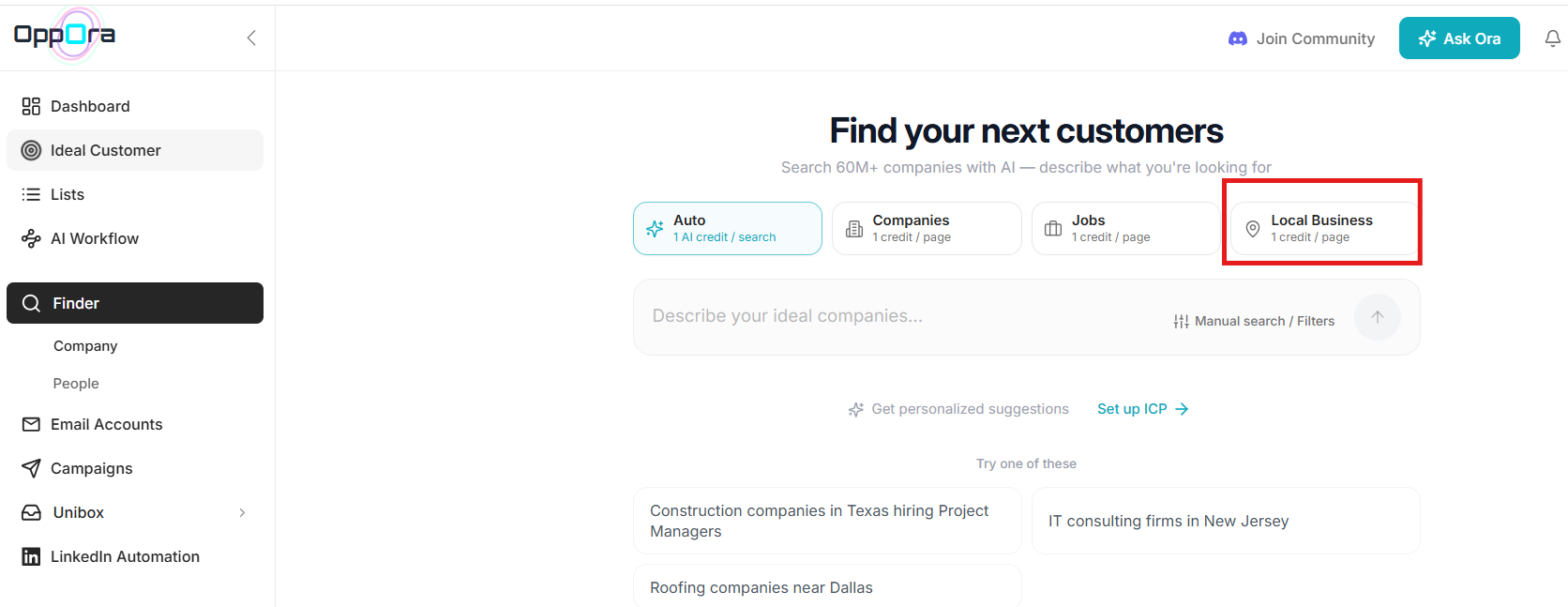
Instead of searching through Google Maps manually, you can discover local businesses at scale using Oppora's Google Business Profile data.
Simply enter a business category, choose a location, and define the search radius.
For restaurant outreach, you can search using:
For example:
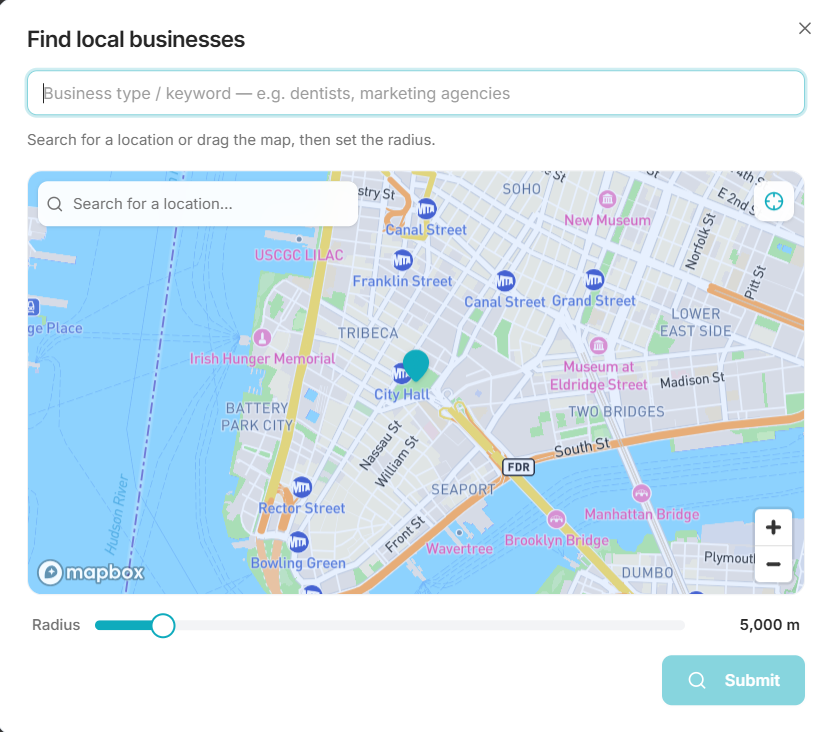
Once you submit the search, Oppora scans Google Business Profiles and returns a list of matching businesses.
Each profile typically includes:
You can then export the results or save them into a prospect list for outreach campaigns.
Instead of spending hours collecting restaurants one by one from Google Maps, Oppora helps you build a targeted local business list in minutes.
Once you've identified restaurants that match your criteria, select the companies you'd like to target and save them to a list.
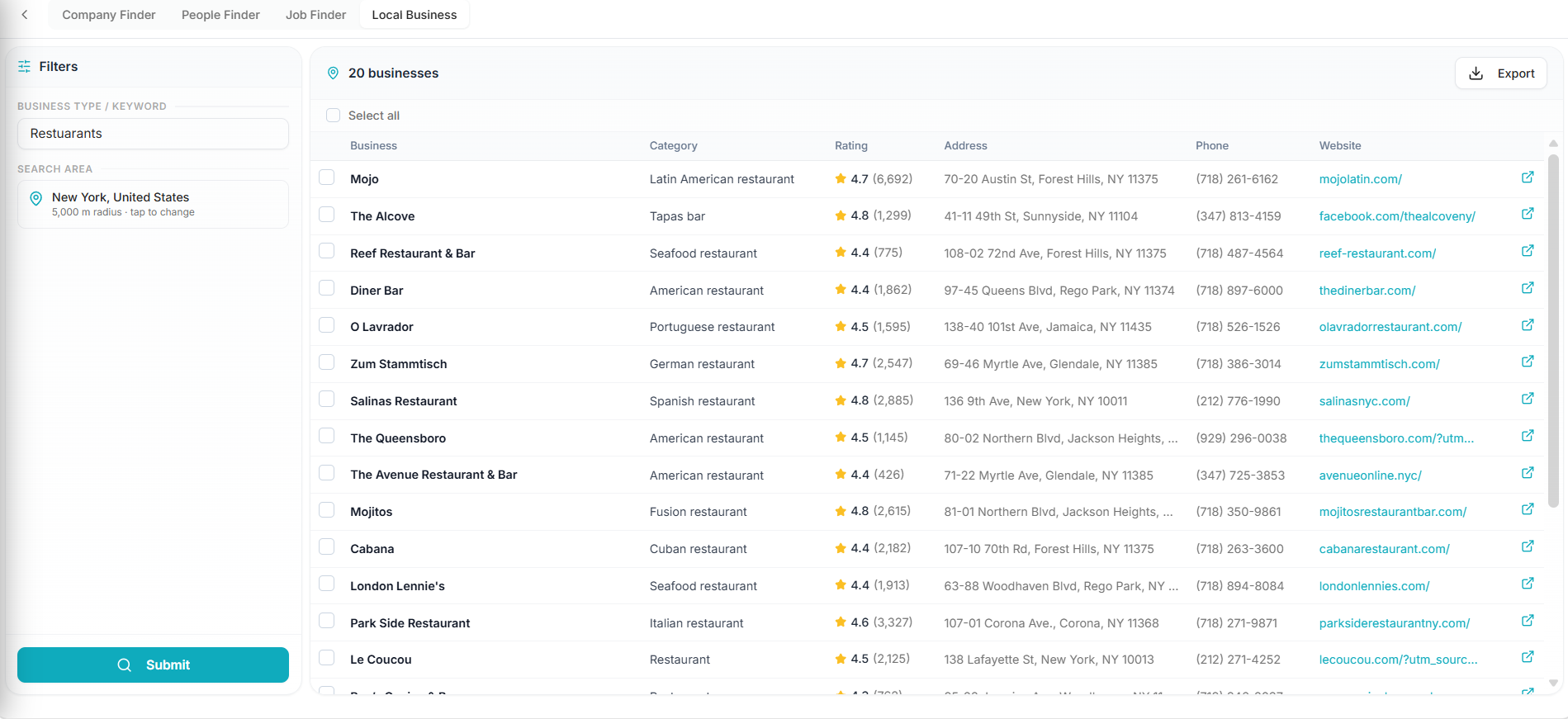
You can create lists based on geography, restaurant type, or campaign goals, such as:
After creating your list, Oppora lets you define the decision-makers you want to target within those businesses.
For restaurant outreach, common personas include:
You can configure how many contacts you want to find per restaurant, helping you build a list that includes multiple stakeholders instead of relying on a single point of contact.
For example, you might choose to pull:
Once configured, Oppora.ai automatically starts discovering relevant contacts associated with each restaurant in your list.
Once you have created your restaurant list and identified the right decision-makers, the next step is finding contact details for outreach, such as phone numbers, email addresses, and LinkedIn profiles.
Oppora enriches each contact by searching across multiple data sources to uncover available information associated with the people you've selected.
Depending on data availability, Oppora.ai can provide:
After enrichment is complete, you can review the results, save contacts inside Oppora.ai, export them, or move them directly into outreach campaigns.
At this stage, you've gone from a list of restaurants to a targeted database of restaurant owners and decision-makers with verified contact information ready for outreach.
Local Business Finder works well when you're targeting independent restaurants or businesses within a specific geography who have presence on Google Maps as Google My Business profile.
However, if you're selling products or services that benefit multi-location operators, franchise groups, or hospitality brands, Company Finder is the better option.
Inside Finder → Companies, you can search for larger organizations using filters such as:
For example, you can search for:
Restaurant chains in the United States with 100–500 employees
or
Fast-growing hospitality companies with multiple locations
Once you've identified relevant companies, add them to a list and follow the same enrichment workflow to discover key decision-makers.
This helps you find contacts such as:
Instead of reaching out to individual locations one by one, you can connect with the people responsible for purchasing decisions across dozens or even hundreds of restaurants.
For agencies, software providers, food suppliers, and hospitality vendors, landing a single restaurant group can open opportunities across an entire network of locations.
Suggested Reading:
How to Automate Your Sales Process in 5 MinutesFinding restaurant owners is only half the process.
The next challenge is ensuring your emails actually land in inboxes and generate responses.
This is where outreach infrastructure becomes important.
Scaling outreach from a single mailbox creates unnecessary risk.
Oppora allows you to connect multiple sending inboxes and rotate them automatically.
This helps distribute sending activity while maintaining healthy sender reputations.
As outreach volume increases, campaigns remain stable without relying on a single account.
Deliverability often depends on subtle factors.
One useful tactic is matching sender identity with the recipient's provider.
If a prospect uses Gmail, emails can be sent from Gmail.
If they use Outlook, outreach can originate from Outlook.
Oppora.ai automates this process to help improve trust signals and increase inbox placement rates.
Restaurant owners receive outreach every day.
Generic messaging usually gets ignored.
Oppora.ai enables personalized sequences at scale using variables, enrichment data, and AI-generated messaging.
You can build campaigns with:
This keeps outreach relevant without requiring manual customization for every contact.
Not every restaurant owner responds to cold emails immediately.
Adding LinkedIn touchpoints can improve familiarity and increase reply rates.
Oppora.ai lets you combine:
This creates a more natural buying journey.
As campaigns grow, conversations quickly become difficult to manage.
Oppora consolidates replies into a shared inbox where teams can monitor activity in one place.
Instead of switching between accounts, you can:
That makes pipeline management significantly easier.
Suggested Reading:
How to Build a Prospect List Without Manual Research — Try Oppora.ai in LiveManaging restaurant leads manually becomes messy over time.
Oppora.ai automatically updates lead status and syncs information into your CRM.
You can track stages such as:
This reduces manual data entry and keeps records accurate.
Here's a rewritten version that incorporates the reviewer's suggestion and feels more tangible, conversational, and product-led.
Finding restaurant owners is one thing. Continuously discovering new restaurants, enriching contacts, and launching outreach every day is another challenge entirely.
Even with the right tools, you still need to search, enrich, verify, personalize, send, monitor, and follow up.
Oppora's AI Workflows turn these repetitive tasks into a self-running system.
For example, you could create a workflow that says:
Every day at 9 AM, find restaurants in Texas within 100 miles of radius, identify Owners and General Managers, enrich their profiles with verified emails, phone numbers, and LinkedIn URLs, add them to my existing outreach campaign, and start sending personalized emails automatically.
Once activated, Oppora handles the entire process for you by:
The result is a prospecting engine that keeps generating restaurant leads and running outreach campaigns on autopilot, without requiring you to log in every day.
Finding restaurant owner email addresses doesn't need to involve hours of research, spreadsheet work, and manual enrichment.
With the right process, you can identify restaurants, uncover decision-makers, collect verified contact details, and launch outreach campaigns within minutes.
For teams targeting restaurants at scale, combining lead generation, enrichment, email infrastructure, and automation into a single workflow can significantly reduce prospecting effort while improving campaign performance.
Yes. Oppora uses multiple enrichment sources and built-in email verification to help surface accurate business contacts. This reduces bounced emails and improves the chances of reaching the right decision-maker.
Cold outreach is generally allowed when conducted responsibly and in compliance with regulations such as GDPR, CAN-SPAM, and other local privacy laws. It's important to contact relevant businesses, provide value, and include clear opt-out options in your emails.
It depends on your plan. The Free plan includes 100 company and lead searches, the Pro plan offers 10,000 searches per month, and the Max plan provides unlimited company and lead searches, making it easy to scale restaurant prospecting as your outreach grows.
Oppora's Local Business Finder pulls data directly from Google Maps, giving you access to all restaurant listings available on Google within your target area. For professional contact enrichment, Oppora also provides access to a database of 1B+ leads sourced from LinkedIn and other professional networks
Summarize with AI
Share