Home
Blog
Oppora’s Claude MCP is Live. Connect our Email Database & Outreach features with any tool to build smart automations inside Claude.
Home
Blog
Stephen Parker
Published July 15, 2026
10 min

Try Oppora AI
Create Self-Running Agentic Sales Workflows like N8N just by chatting with AI
Get Started for FREE
Finding a decision-maker’s direct phone number can take more time than expected.
You may know exactly who you need to contact, yet still face switchboards, generic numbers, or outdated records.
With the right process, you can identify the right person and find verified contact details in minutes.
In this guide, you will learn how to:
Finding a direct phone number becomes easier when you stop searching one contact at a time.
Oppora AI helps you move from defining your target market to building an organized list of decision-makers with verified contact details.
Start by deciding what a qualified prospect looks like for your business.
You can define your ideal customer profile using details such as:
You should also identify the roles involved in the buying decision.
Depending on what you sell, this may include founders, sales leaders, operations managers, HR directors, or IT decision-makers.
A clear profile prevents you from collecting phone numbers that never turn into relevant conversations.
Once you know who you want to reach, you can use Oppora to discover matching companies across different data sources.
You can choose the search method based on the type of prospects you need.
For local businesses, agencies, clinics, restaurants, or service providers, Google Maps-based discovery can help you find companies within a specific location.
You can narrow the search using business categories, cities, regions, and other local criteria.
For broader B2B prospecting, you can use a traditional company finder.
This method allows you to search companies by industry, employee count, revenue, location, and other firmographic filters.
Using both options gives you more flexibility.
You can build a local calling list from Google Maps or create a larger account-based list using traditional company search filters.
A company may match your target market, but that does not mean every employee is a useful contact.
You still need to identify the person who owns the problem your product solves.
Oppora can help you search for relevant people within each company based on their department, seniority, and job title.
You can look for roles such as:
You can also include several stakeholders when a purchase involves more than one department.
This helps you avoid relying on a single contact and gives you more ways to enter the account.
Suggested Reading:
How to Find Someone’s Phone Number for Business Outreach LegallyAfter identifying the right people, the next step is finding reliable contact information.
Oppora can enrich each profile with available details such as direct phone numbers, business emails, job titles, company information, and professional profiles.
The platform uses multiple data sources rather than depending on a single database.
This improves your chances of finding a current direct number instead of an old record or generic company switchboard.
Verification is especially important when you plan to call a large number of prospects.
Cleaner contact data means fewer wrong numbers, fewer wasted calls, and more opportunities to speak with the right person.
Finding phone numbers is only useful when your team can act on them.
Oppora helps you organize decision-makers into structured lead lists based on your campaign, territory, industry, or sales priority.
Each record can include the details your sales team needs before making a call.
This may include:
You can then assign lists to team members or move contacts into your outreach workflow.
Your sales team spends less time cleaning spreadsheets and more time starting conversations.
You do not need to rebuild your prospect list if you already have company names, email addresses, or LinkedIn profiles.
You can import your existing data into Oppora and enrich the missing fields.
Oppora can clean the list, remove duplicate records, update company information, and search for available direct phone numbers.
It can also help you verify whether each contact still works at the company listed in your file.
This gives you a faster way to turn a basic spreadsheet into a more complete calling list.
Instead of manually researching every prospect, you can prepare your existing leads for cold calling and multi-channel outreach in one place.
Finding the right phone number gives you a direct way to start the conversation.
But your results still depend on who you call first, what you say, and how you follow up after the call.
Not every lead deserves the same level of attention.
Start with prospects showing signs that they may already need what you offer.
Useful buying signals can include:
Oppora AI can help you organize and score prospects using these signals.
Your sales team can then call the strongest opportunities first instead of working through a list in random order.
A direct number gets you closer to the decision-maker, but a generic pitch can still end the call quickly.
Before dialing, review the prospect’s company, role, current priorities, and possible challenges.
You might mention a recent expansion, a job posting, or a specific service the company provides.
This shows that you are calling with a clear reason.
Oppora can collect relevant company and contact insights within the lead record.
You can use this information to prepare a more specific opening line without researching every prospect manually.
Suggested Reading:
How to Send Personalized Emails at Scale Without Spam Flags
Decision-makers may not answer an unfamiliar number on the first attempt.
That does not mean the opportunity is lost.
You can support your call with a short email or LinkedIn message explaining why you reached out.
A simple sequence may look like this:
Oppora allows you to add email and LinkedIn steps into the same outreach workflow.
This helps you stay visible without depending on one communication channel.
Suggested Reading:
How to Combine LinkedIn Outreach with Email CampaignsMulti-channel outreach can become difficult to track when replies are spread across several inboxes and tools.
One prospect may respond by email, while another accepts your LinkedIn request after you have already called them.
Oppora brings replies from connected email inboxes into one shared view.
Your team can review conversations, update lead statuses, and decide who should follow up next.
This makes it easier to avoid duplicate outreach or missed responses.
Instead of switching between spreadsheets, inboxes, and prospecting tools, you can manage each conversation from one organized place.
Finding one decision-maker is useful.
Building a system that finds new ones every day is much more valuable.
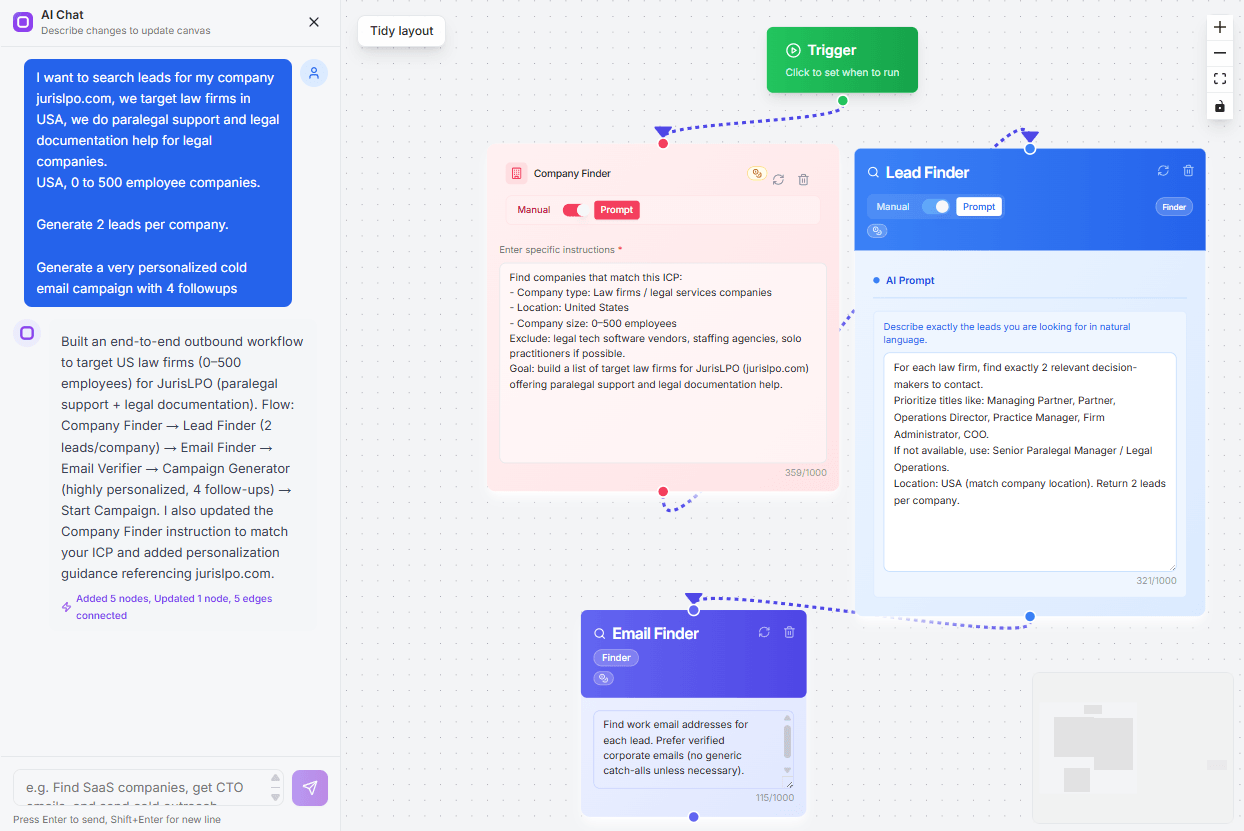
With Oppora AI, you can create an automated workflow that keeps searching for companies, identifying the right contacts, and enriching them with available phone numbers and business details.
You can define the conditions once, such as industry, location, company size, job title, or buying signal.
Oppora then uses those rules to keep finding relevant prospects without requiring you to repeat the same searches manually.
You can also add triggers to the workflow.
A trigger might start the process when a company posts a new job, enters a target market, changes leadership, or matches another condition relevant to your offer.
From there, Oppora can:
You can also set review checkpoints before contacts enter your campaign.
This gives you control over lead quality while still removing repetitive research from your daily routine.
Instead of opening multiple tools every morning, you can let the workflow continue running in the background of your sales process.
Your team starts each day with new decision-makers ready to review, call, and contact across other channels.
You can still find useful contact details without paying for a prospecting tool
These methods take more time, so always verify the number before calling.
Start with the company website and check:
Some companies publish direct numbers for managers, department heads, or regional leaders.
Use LinkedIn to identify the right decision-maker first.
Check the person’s:
Even when a phone number is not listed, LinkedIn gives you the details needed for a more focused search.
Google can uncover phone numbers mentioned on public pages.
Try searches such as:
Check the date of the page before using the number.
Free directories may provide company numbers, office locations, and contact names.
Useful sources include:
These sources often show switchboard numbers, so confirm whether the number is direct.
Check professional profiles on:
Decision-makers may share business phone numbers, booking links, or personal websites there.
Only use publicly available contact details and respect privacy and local outreach rules.
Finding a direct phone number gives you access.
How you handle the conversation determines whether that access turns into a real opportunity.
Review the prospect before making the call.
Check their role, company priorities, recent activity, and possible challenges.
Prepare:
Avoid reading from a long script.
You should sound prepared, but the conversation should still feel natural.
Only use phone numbers collected from legitimate and publicly available sources.
You should also follow the calling, consent, and privacy rules that apply in the prospect’s location.
Before launching a campaign:
Responsible outreach protects your reputation and creates a better experience for prospects.
Decision-makers may not answer the first call.
Instead of repeatedly dialing, support your call with a short email or LinkedIn message.
Your follow-up can include:
Space your follow-ups appropriately and change the message each time.
A coordinated mix of calls, emails, and LinkedIn outreach helps you stay visible without becoming repetitive.
Finding a decision-maker’s direct phone number does not have to take hours.
A clear process helps you identify the right companies, locate relevant contacts, verify their details, and organize them for outreach.
You can use free methods such as LinkedIn, company websites, directories, and Google search operators.
However, manual research becomes difficult when you need accurate contact details at scale.
The strongest results come from combining verified data with thoughtful outreach.
Research each prospect, prepare a relevant reason for calling, and follow up through email or LinkedIn when needed.
You should also respect privacy rules and remove anyone who asks not to be contacted.
When you are ready to reduce manual research, Oppora AI can help you discover decision-makers, enrich lead lists, and build automated outreach workflows.
Explore Oppora.ai to see how you can spend less time searching for contact details and more time having meaningful sales conversations.
You can generally use publicly available business contact information for legitimate outreach, but you must follow the privacy, telemarketing, consent, and do-not-call rules that apply in the prospect’s location.
The fastest method is to use a contact enrichment tool that searches multiple data sources and filters prospects by company, role, seniority, and location.
Direct phone numbers usually improve your chances of reaching the right person because you avoid receptionists and automated menus, although timing and message relevance still affect results.
Use another professional channel such as email, LinkedIn, a booking page, or the company’s main number instead of searching for private contact details.
Yes, AI prospecting tools can identify relevant decision-makers, enrich lead records with available contact details, organize prospects, and prepare them for outreach more efficiently.
Summarize with AI
Share