Home
Blog
Oppora’s Claude MCP is Live. Connect our Email Database & Outreach features with any tool to build smart automations inside Claude.
Home
Blog
Stephen Parker
Published June 29, 2026
12 min

Try Oppora AI
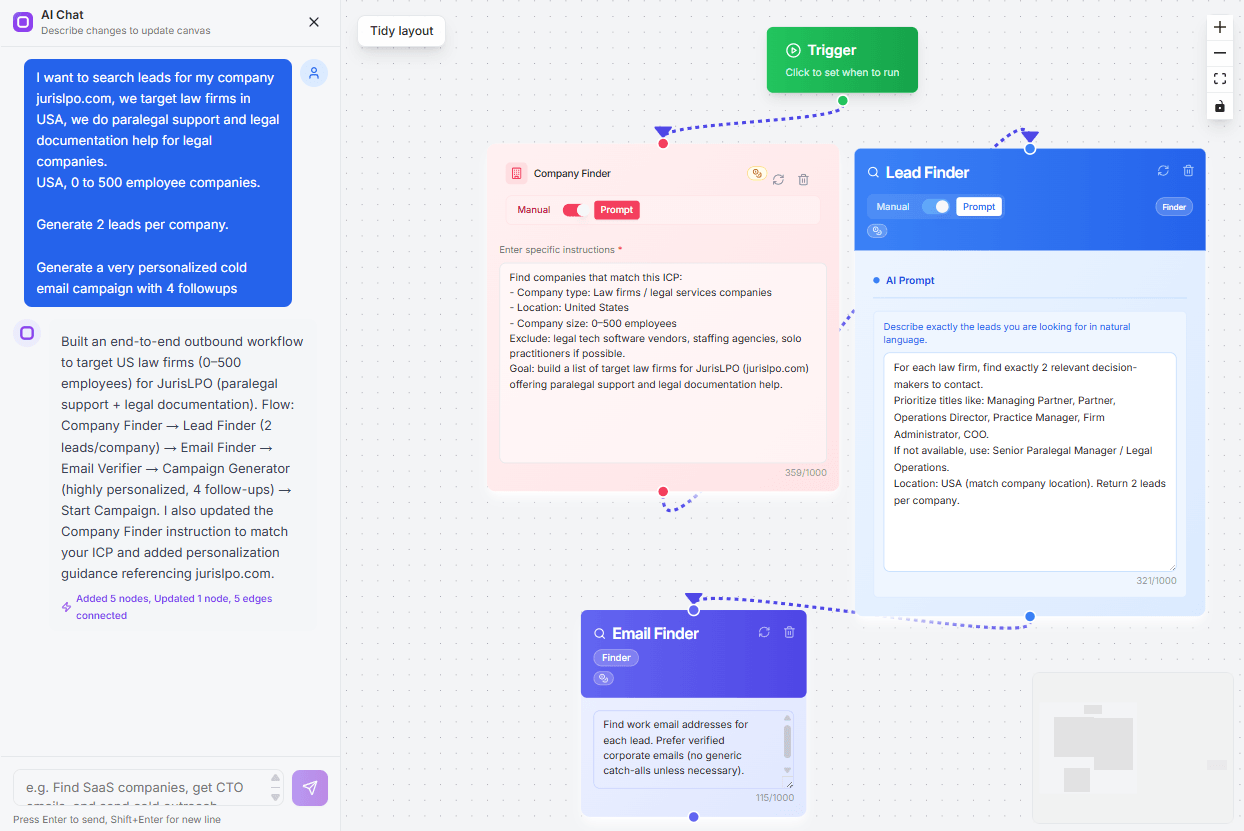
Create Self-Running Agentic Sales Workflows like N8N just by chatting with AI
Get Started for FREE
LinkedIn prospecting sounds simple until you actually try to do it every week.
You search for prospects, check titles, copy names into sheets, find emails, write messages, follow up, update your CRM, and still worry that good leads are slipping through the cracks.
That is why automation matters.
Not because you need more noise in more inboxes, but because you need a cleaner way to find, organize, reach, and respond to the right people.
In this guide, you’ll learn how to:
Most LinkedIn prospecting does not fail because people are lazy.
It fails because the workflow becomes too heavy before it has enough momentum to produce replies, meetings, or real pipeline.
You start with a simple goal: find the right people and start conversations.
But very quickly, that turns into a long chain of manual tasks that eat your week.
Finding good leads takes more than typing a job title into LinkedIn.
You need to check company size, role relevance, industry fit, location, recent activity, and whether the person actually matches your ideal customer profile.
When this is done manually, you can spend hours building a list before sending a single message.
And by the time the list is ready, the energy to personalize and follow up is already gone.
Prospecting becomes even slower when your data lives in five different places.
You find someone on LinkedIn, search for their email in another tool, paste details into a spreadsheet, then update your CRM later.
Every switch creates friction.
It also creates room for mistakes, duplicate leads, missing notes, and outdated contact data.
Most prospects do not reply to the first message.
That means your follow-up system matters as much as your first touch.
But when follow-ups depend on memory, tabs, and calendar reminders, warm prospects get missed.
A good lead can go cold simply because you forgot to send the second or third message.
The point of automation is not to blast more people.
It is to remove the repetitive work that slows you down.
A strong LinkedIn prospecting workflow should help you find better leads, enrich them faster, personalize outreach, follow up on time, and keep your CRM clean without adding more manual effort.
Once you remove the manual drag, LinkedIn prospecting starts to feel less like admin work and more like a repeatable sales system.
Today, a good workflow should not just help you send messages faster. It should help you move from targeting to conversations with fewer gaps in between.
Everything begins with knowing who you want to reach.
Your ICP should include details like industry, company size, location, job title, seniority, pain points, and buying triggers.
Without this, automation only helps you reach the wrong people faster.
Once your ICP is clear, automation can help you find people who match it.
Instead of scrolling through profiles one by one, your workflow should identify founders, heads of sales, marketing leaders, operations teams, recruiters, or any role that fits your target market.
This gives you a stronger list before outreach even begins.
A LinkedIn profile alone is not always enough.
You may need verified emails, company details, websites, phone numbers, job changes, or other signals that help you understand the lead better.
Lead enrichment makes your prospecting list more useful and easier to act on.
Personalization should not mean adding only a first name.
AI can help you create messages based on a person’s role, company, industry, LinkedIn activity, or likely business challenge.
That makes your outreach feel more relevant without forcing you to write every line from scratch.
Not every prospect replies on LinkedIn.
Some respond better to email, while others need a few touches across both channels.
A modern workflow should let you combine LinkedIn outreach and cold email in one sequence.
Suggested Reading:
How to Nurture Cold Leads With Automated Email SequencesThe real goal is not just getting responses.
It is turning interest into booked calls.
AI can help answer simple questions, qualify replies, share resources, and route warm leads so you spend more time on real conversations.
Once your workflow is clear, the next step is building a system that can actually run it.
This is where Oppora.ai helps you move from manual LinkedIn searching to a cleaner prospecting engine.
Instead of jumping between tools, you can find leads, enrich them, organize them, and prepare them for outreach from one place.
A strong prospecting engine starts with better lead data.
With Oppora.ai, you can search for prospects based on:
So instead of collecting random LinkedIn profiles, you can build lead lists around your exact ICP.
That means your outreach starts with people who are more likely to match your offer.
Sometimes your best prospects are already in front of you on LinkedIn.
The Oppora LinkedIn Extension helps you capture leads while browsing LinkedIn profiles or search results.
You can use it to:
So when you find a promising founder, sales leader, recruiter, agency owner, or decision-maker, you do not need to copy and paste their details manually.
You can save the lead and keep moving.
A LinkedIn profile tells you who someone is.
But enrichment tells you how to reach them and whether they are worth prioritizing.
Oppora.ai helps enrich prospects with:
This gives your sales workflow stronger data before the first message goes out.
You are not reaching out with incomplete information. You know who the person is, where they work, and how they fit your campaign.
Spreadsheets can work when you have a small list.
But once you are trying to reach hundreds of leads every week, they become messy very quickly.
With Oppora.ai, you can organize prospects by:
This keeps your LinkedIn prospecting workflow clean from the start.
Instead of asking where a lead was saved or whether they were already contacted, you can move straight into personalized outreach.
Once your prospect list is ready, the next challenge is turning that data into conversations.
This is where many teams slow down again.
They have the right leads, but writing messages, setting follow-ups, managing inboxes, and keeping outreach relevant still takes too much manual work.
Oppora.ai helps you move from “I have a list” to “my campaign is running” much faster.
Suggested Reading:
How to Build a Prospect List Without Manual Research — Try Oppora.ai in LiveA good sequence should feel personal without taking hours to create.
With Oppora.ai, you can use AI Variables to build dynamic email sequences that adjust based on each prospect.
These variables can help personalize messages around nhnn:
So instead of writing every email manually, you can create a sequence once and let AI adapt parts of the message for each lead.
Suggested Reading:
How to Nurture Cold Leads With Automated Email SequencesSpin text only changes words.
Real personalization changes the meaning of the message based on who the prospect is.
Oppora.ai helps you create unique email lines for each person, so your outreach does not feel copied, recycled, or robotic.
This helps you avoid:
Your goal is not to trick people into thinking you wrote everything by hand.
Your goal is to make every message relevant enough to deserve a reply.
Personalization is not only about what you say.
It also includes how your email is sent.
Oppora.ai can match sender identity based on the lead’s email provider, such as Gmail-to-Gmail or Outlook-to-Outlook.
This helps your outreach feel more natural and can support better deliverability.
When your sending setup looks cleaner, your emails have a better chance of landing where prospects can actually see them.
LinkedIn prospecting becomes stronger when it does not live alone.
Some leads reply on LinkedIn. Others prefer email.
Oppora.ai lets you combine LinkedIn outreach and cold email into the same sales workflow.
You can use this to:
This gives your outreach more chances to create a conversation without making your workflow harder to manage.
If you want to reach 500+ leads weekly, one inbox is usually not enough.
But scaling outreach without control can hurt your sender reputation.
With Oppora.ai, you can connect multiple inboxes and rotate sending across them.
This helps you:
So instead of pushing one inbox too hard, you build a sending system that can grow with your weekly prospecting goals.
Finding leads and sending the first message is only half the work.
The real pressure starts after that.
You need to follow up at the right time, respond when someone replies, share the right resources, update deal stages, and make sure no warm lead gets buried inside an inbox.
With Oppora.ai, these steps can run through no-code workflows instead of manual tracking.
Oppora.ai lets you build outreach workflows without writing code or managing complex automation rules.
You can create a workflow that connects each step of your prospecting process, such as:
This helps you turn LinkedIn prospecting from a loose set of tasks into one connected system.
You define the flow once, and the workflow keeps running without daily manual effort.
Most leads will not reply to your first message.
That is why your follow-up sequence needs to be consistent, timely, and relevant.
With Oppora.ai, you can automate multi-touch follow-ups across your campaign.
You can set up follow-ups based on:
This keeps your outreach moving even when you are busy with calls, client work, or closing deals.
Instead of remembering who needs another touch, your workflow handles it for you.
When a lead replies, speed matters.
But not every reply needs your direct attention right away.
Oppora.ai can help manage responses by using AI to reply, qualify interest, answer common questions, and share relevant resources.
It can help with replies like:
This keeps conversations active without forcing you to monitor every inbox all day.
You can focus your time on replies that need human judgment, like serious buying interest or booked meeting opportunities.
A clean CRM is what keeps your pipeline from becoming confusing.
But manual CRM updates are easy to ignore when prospecting volume increases.
Oppora.ai can automatically sync outreach activity and move leads into the right stage based on what happens in the workflow.
You can use this to:
This gives you a clearer view of what is happening across your campaigns.
You are not just sending messages anymore.
You are building a prospecting system that can find leads, follow up, respond, and keep your pipeline organized.
Reaching 500+ leads weekly sounds like a big jump.
But the real question is not, “Can you send more messages?”
The better question is, “Can your workflow find, enrich, personalize, send, follow up, and organize leads without adding more manual work?”
That is where automation becomes a growth system, not just a sending tool.
Your team should not spend most of the week doing tasks that can run in the background.
With Oppora.ai, you can automate repetitive steps like:
This gives your team more room to focus on conversations, strategy, and closing.
Instead of hiring more people to handle manual prospecting, you can let AI agents manage the busywork.
Scaling outreach from one inbox can create deliverability problems.
If one mailbox sends too much too quickly, your emails may start landing in spam.
Oppora.ai helps you scale more safely by letting you connect and rotate multiple mailboxes.
This helps you:
So when your weekly lead goal increases, your sending setup can support it without putting one inbox under pressure.
Not every lead deserves the same attention.
Some prospects are a better fit because of their role, company stage, industry, hiring activity, buying signals, or recent business changes.
AI helps you prioritize those leads before your team spends time on them.
You can use this to:
This matters when you are working with hundreds of leads every week.
The goal is not just more volume.
The goal is more qualified conversations.
Once your campaigns are running, you need to know what is working.
Oppora.ai helps you track campaign performance so you can improve each part of your workflow.
You can monitor:
This helps you stop guessing.
You can see which audience responds, which message performs better, and which campaigns deserve more volume.
That is how you scale LinkedIn prospecting weekly without simply adding more tools, more tabs, or more people.
LinkedIn prospecting is no longer about manually collecting profiles and hoping someone replies.
To reach 500+ qualified leads every week, you need a workflow that can handle the heavy lifting for you.
That means finding the right prospects, enriching contact data, personalizing outreach, sending follow-ups, managing replies, and keeping your CRM updated without turning your week into admin work.
Automation helps when it makes each step easier, cleaner, and more connected.
It should not just help you send more messages. It should help you build a better prospecting system.
With Oppora.ai, you can bring LinkedIn prospecting, email outreach, AI personalization, reply handling, and CRM sync into one workflow.
So instead of scaling your team just to scale your outreach, you can let AI agents manage the repetitive work while you focus on conversations that can turn into revenue.
LinkedIn prospecting automation means using tools or AI workflows to find prospects, enrich data, send outreach, follow up, and update your CRM without doing every step manually.
Yes, if you use it carefully. Keep activity natural, avoid mass spam, personalize your messages, and use automation to support your workflow, not abuse the platform.
Limit daily actions, avoid random messaging, personalize outreach, and combine LinkedIn with email so all activity does not depend on one channel.
Yes. LinkedIn and cold email work well together because some prospects respond better on LinkedIn, while others prefer email.
Oppora.ai helps you find leads, enrich contacts, personalize outreach, automate follow-ups, manage replies, and sync CRM activity from one connected workflow.
Summarize with AI
Share